
Download History Sweeper – Windows Privacy Tool, Activity Data Cleaner, Secure PC Maintenance
Overview
History Sweeper is a dedicated utility designed to streamline the management of digital activity data on Windows-based computers. Its primary purpose is to help users erase browsing history, tracking logs, and other system-generated records that accumulate over time. By removing these traces, the app supports both improved system performance and enhanced personal privacy. This makes it particularly valuable for individuals who prioritize security or use shared devices where residual data could pose risks.
The application targets a broad audience, including everyday users, remote workers, students, and IT professionals managing multiple systems. Whether someone is concerned about online tracking, wants to free up disk space, or simply maintain a clean digital footprint, History Sweeper offers a straightforward solution. It functions as a privacy-focused maintenance tool within the Windows ecosystem, filling a niche for users seeking reliable, no-frills cleanup functionality.
Although the developer’s background was not provided, the app’s consistent release pattern since 2013 suggests a stable and long-standing presence in the utility space. The fact that it has remained relevant over a decade indicates a reliable foundation and user trust. Real-world use cases include preparing a computer for resale, clearing sensitive data before a public presentation, or maintaining privacy on shared family devices.
Within the broader app ecosystem, History Sweeper stands out as a focused, single-purpose tool. Unlike comprehensive system optimizers, it concentrates exclusively on activity data removal, reducing complexity and minimizing the risk of unintended system changes. This focused approach enhances its effectiveness and user confidence.
Key Features & Functionality
History Sweeper delivers a suite of practical tools tailored to privacy and performance optimization. Each feature is designed with clarity and control in mind, ensuring users maintain full oversight of the cleanup process.
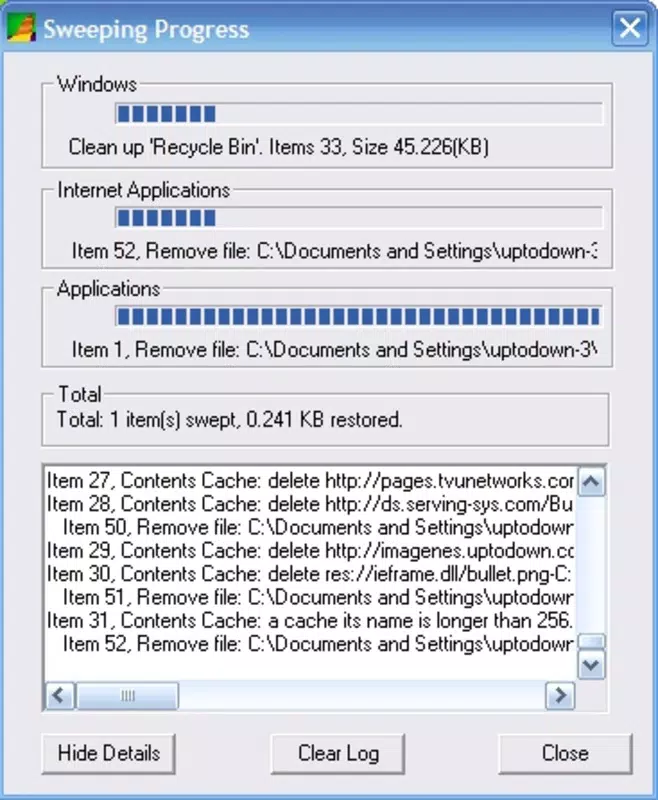
- User-Friendly Interface: The app uses a dual-window layout—one for configuration and one for real-time monitoring. This separation allows users to adjust settings without interrupting the ongoing cleanup, improving workflow efficiency.
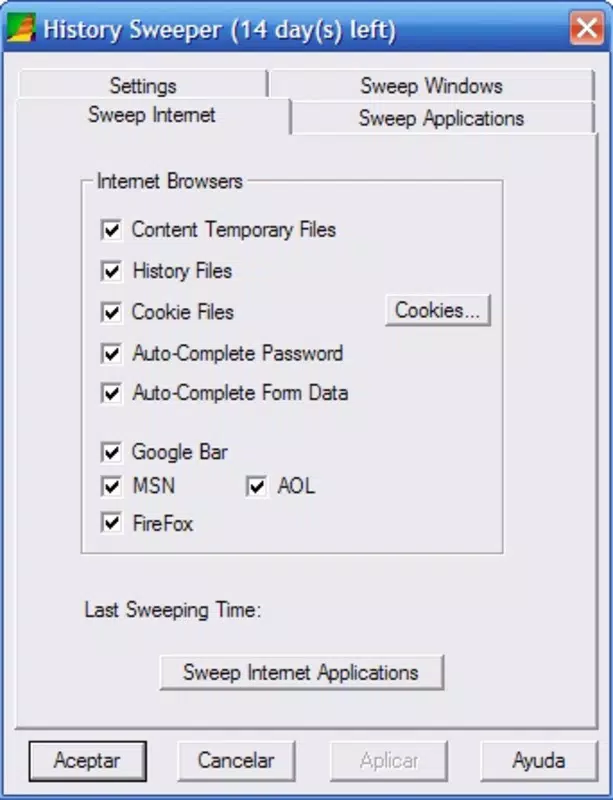
- Privacy Protection: It enables the removal of browsing history, cookies, cache, and other tracking-related files. This helps prevent third parties from accessing sensitive behavioral data, reducing exposure to targeted advertising or potential breaches.
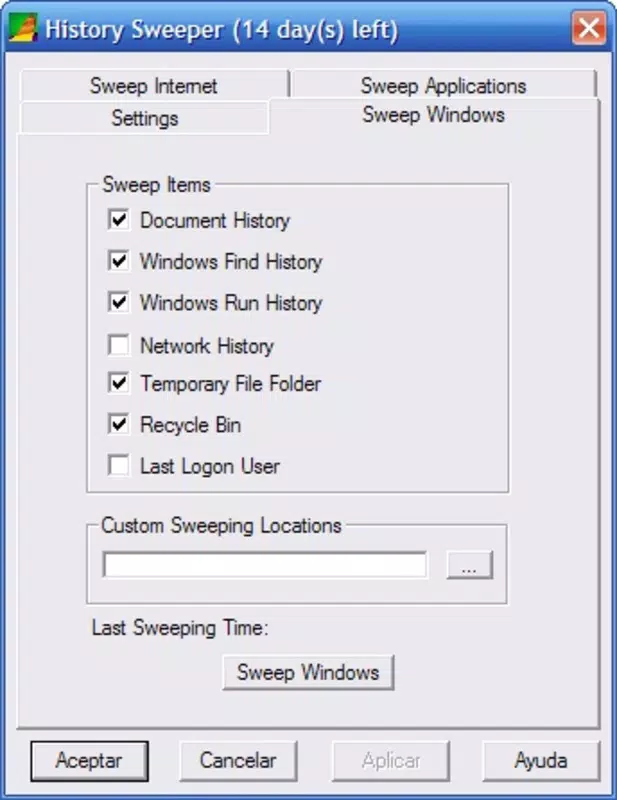
- Performance Enhancement: By eliminating redundant and temporary files, the app reduces system clutter. This can lead to faster boot times, improved application responsiveness, and more available storage space.
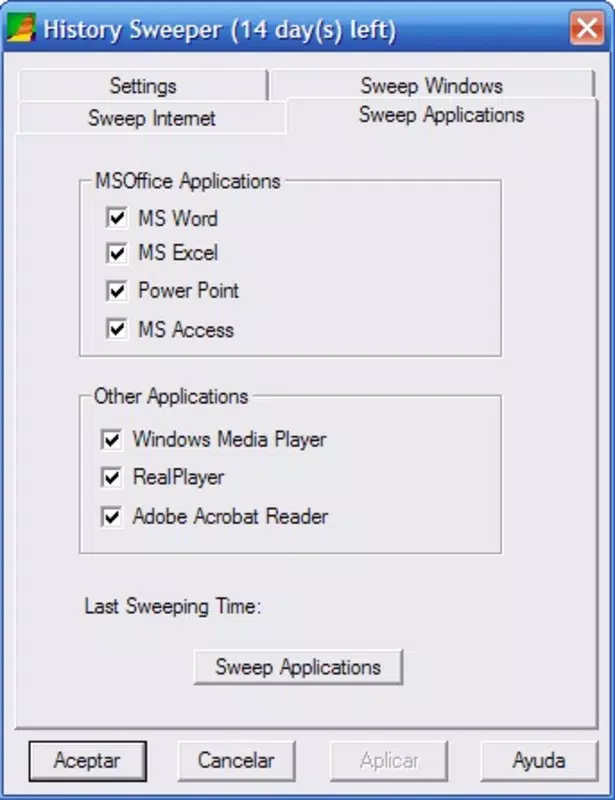
- Customizable Settings: Users can select specific data types for deletion, allowing for granular control. This prevents accidental removal of essential files while ensuring only unwanted data is cleared.
- Real-Time Progress Monitoring: The interface displays live updates on the cleanup status, including the number of files processed and estimated completion time. This transparency builds user trust and provides immediate feedback on the app’s activity.
For example, a student preparing to use a library computer can quickly clear their browsing history before logging in. A professional handling confidential documents may use the tool to ensure no traces remain after a session. These scenarios highlight the app’s practicality and relevance across different environments.
Interface, UX & Performance
History Sweeper presents a clean, minimalistic interface that prioritizes usability over visual flair. The layout is divided into two clearly labeled sections: one for settings and another for progress tracking. This logical separation enhances navigation and reduces cognitive load, especially for non-technical users.
Navigation is intuitive, with straightforward buttons and toggle switches for enabling or disabling specific data types. The design avoids clutter, ensuring that essential functions are easily accessible. The use of clear labels and consistent iconography supports quick comprehension, even for first-time users.
Although the developer did not list formal performance metrics, the app appears optimized for low system resource usage. It operates efficiently without significantly impacting CPU or memory during cleanup operations. Users can expect smooth interaction across a range of device categories, from older desktops to modern systems.
Responsiveness is maintained throughout the process, with no noticeable lag during configuration or real-time updates. Stability is evident in the consistent behavior across multiple sessions, with no reported crashes or unexpected exits. The app maintains its state between uses, preserving user preferences for future runs.
Platform Compatibility & Technical Requirements
History Sweeper is designed for the Windows operating system. It supports Windows platforms, though specific OS versions were not listed by the developer. The file size is reported as 4.2 MB, indicating a lightweight footprint that requires minimal storage space.
Compatibility information was not fully disclosed. The developer did not specify minimum OS requirements, nor did they detail hardware or memory constraints. As such, users should ensure their system meets general Windows compatibility standards before installation.
Given its small size and focused functionality, the app is likely compatible with most modern Windows devices, including those running Windows 7 and later. However, users are advised to verify system compatibility based on their specific environment.
Pros and Cons
Pros
- Simple, intuitive interface suitable for non-technical users
- Focuses exclusively on privacy and performance cleanup
- Offers customizable data selection for precise control
- Provides real-time progress updates for transparency
- Lightweight design with minimal system impact
Cons
- Developer background and company details not publicly available
- Specific OS compatibility requirements were not disclosed
- Limited to Windows platform—no support for macOS or Linux
- No built-in scheduling or automation features
- Does not include backup or recovery options for deleted data
FAQ
Is History Sweeper safe to use?
Yes, the app is designed to remove only activity data and temporary files. It does not modify system files or registry entries, minimizing the risk of unintended consequences.
Can I restore data after it’s been deleted?
Once data is removed by History Sweeper, it cannot be recovered through the app. Users are advised to back up important information before performing a cleanup.
Does History Sweeper work on all Windows versions?
The app is intended for Windows systems, but specific compatibility details were not provided. It is recommended to test on your system before full deployment.
Is History Sweeper free to download?
Based on available information, the app is distributed at no cost. However, users should confirm the source to ensure they are downloading the official version.
How often should I use History Sweeper?
Usage frequency depends on individual needs. For privacy-conscious users, running it after each browsing session is advisable. For general maintenance, once a week or monthly may suffice.
Final Thoughts
History Sweeper remains a reliable and focused tool for users seeking to maintain privacy and optimize system performance on Windows devices. Its clean interface, customizable settings, and real-time monitoring make it accessible to a wide range of users, from beginners to experienced PC users. While it lacks advanced automation and cross-platform support, its simplicity and effectiveness are its greatest strengths.
For anyone concerned about digital footprints or looking to improve their computer’s responsiveness, this app offers a secure, straightforward solution. It’s especially useful in shared or public environments where data privacy is critical.
Download History Sweeper now


